
Faster starts. Fewer delays.
And smoother handovers.
Send us your starts
Drop us a weekly starts file (CSV, Excel, anything) or enter a lot manually in about 90 seconds. We pull out the addresses and kick off every utility request automatically.
Volume builders: automate the whole weekly run. Custom builders: one lot at a time, same flow.
We request ESI-IDs + temp meters
One process, every Texas utility. Centerpoint, Oncor, AEP North & Central, TNMP, plus the regulated co-ops. You never have to log into their portals.
We chase down problems before they delay you
Permit flags, missing inspections, ESI-IDs stuck in review, install reschedules — we catch them first and tell you what to do, not the other way around.
Our team takes the calls so your construction manager doesn't have to.
One click for the permanent meter
When the slab is poured, the walls are up, the meter can be attached and the inspection's passed, request the perm meter from the dashboard. We schedule, track, and confirm the install.
One click to transfer to the homeowner
At closing, transfer the account to the buyer without four more phone calls. The account moves with the keys.
Every meter, every status,
in one place.
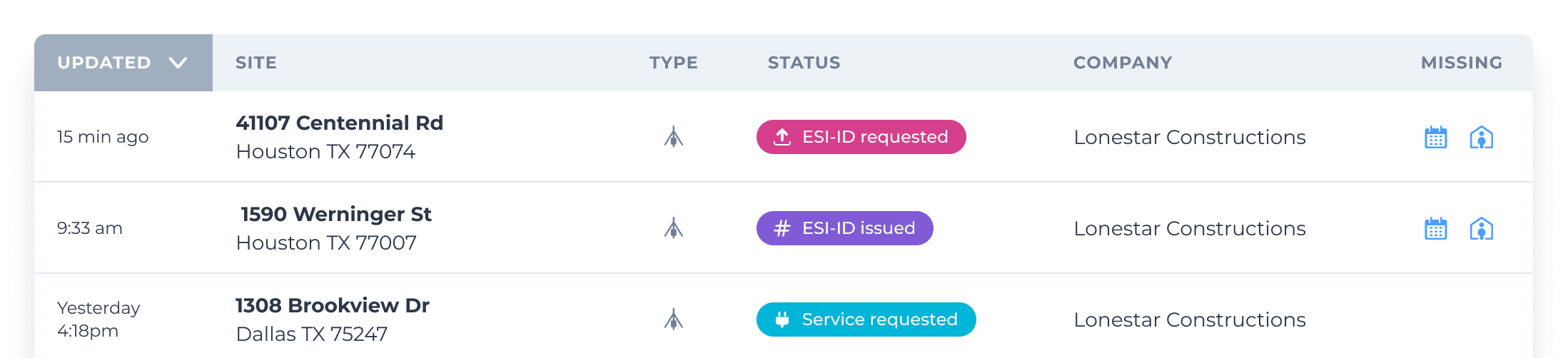
Every team member sees the same live view: ESI-IDs requested, temp meters scheduled, perms installed, homeowner transfers completed. No weekly status meeting required.
Each meter moves along these color-coded status tags…

…then you either close the temp account (with optional swingover to perm)…

…or transfer the perm account to your homeowner at closing.

You're always updated via email, but the easiest way to track every meter at a glance is the dashboard itself:
One process for every Texas utility
Deregulated electric is about 90% of Texas — and free. Regulated, co-op, and gas are the rest. We cover all three.
Deregulated electric
~90% of Texas · free
- AEP Central
- AEP North
- Centerpoint
- LP&L
- Oncor
- TNMP
Regulated & co-ops
$100/home · invoiced on install
The ones we work with most often:
- Austin Energy
- Bluebonnet Electric Cooperative
- Brownsville PUB
- Bryan Texas Utilities
- CPS Energy (San Antonio)
- CoServ
- College Station Utilities
- Denton Power Company
- Entergy
- Farmers Electric Coop
- Grayson-Collin Electric Coop
- HILCO Electric Cooperative
- Lamar Electric Coop
- Magic Valley Electric Coop
- MidSouth Electric Co-op
- Navarro County Electric Coop
- Nueces Electric Cooperative
- Sam Houston EC
- San Bernard Electric Co-op
- San Patricio Electric Cooperative
- Tri-County Electric Coop
- Trinity Valley Electric Cooperative
Natural gas
$100/home · invoiced on install
- Atmos Energy
- Centerpoint Energy
- CPS Energy
Don't see your utility here? We can still request the connection — send us the lot and we'll tell you what's possible.
Import your existing ones in a minute.
Send us whatever list you have and we'll pull the status of every meter you've already requested through another channel.
Something to send to your team.
Give us your next lot.
See for yourself.
Free in deregulated areas. Ten minutes to set up. No contracts.